
Why We Built .XPANDER
Once upon a time, you had to install four or five separate "productivity utilities" just to work efficiently on your Windows PC.
You needed one app for text expansion, a second utility to fix accidental CAPS LOCK keystrokes, a third helper to make Windows Open/Save file dialogs jump to the folder you already had open in File Explorer, and a fourth tool just to insert dynamic dates and timestamps.
Combined, those four background utilities devoured over 1.2 GB of RAM, spawned 14 mysterious background processes, and ground to a halt the second you bought a modern ARM64 Snapdragon Copilot+ laptop. Why? Because their legacy 32-bit keyboard hooks could not run natively on modern ARM architecture without melting the CPU inside heavy translation layers.
We got tired of hauling around an entire bloated toolbox. So .XPANDER was created with one crystal-clear mission:
Unite the 4 to 6 high-impact workflows that actually account for 95% of your daily keyboard productivity into one pocket-sized native Swiss Army knife—weighing ~4.6 MB of RAM, fiercely protecting your privacy, and running razor-sharp on both x64 and ARM64 Windows machines!
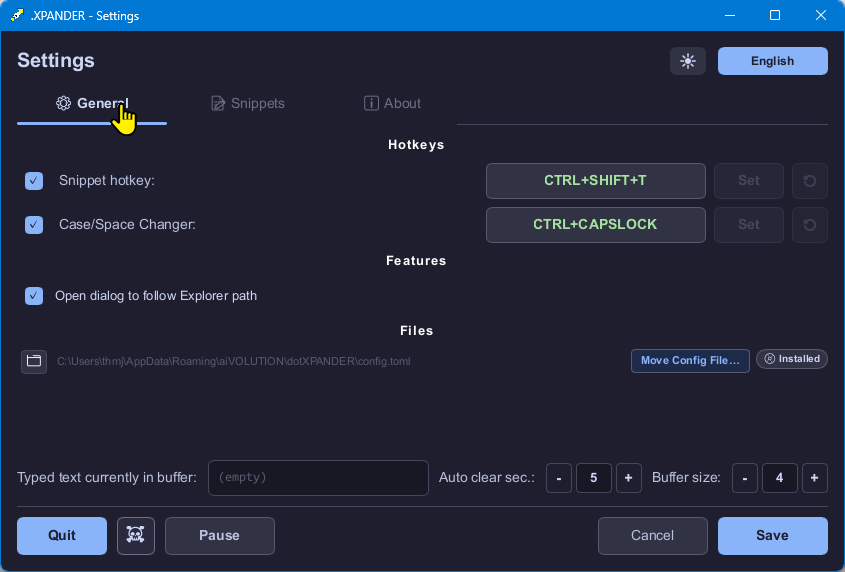
~4.6 MB RAM · 0.0% Idle CPU · x64 & ARM64
Six Non-Negotiable Engineering Pillars
1. Native ARM64 & x64 Without Emulation Tax
Compiled directly to native machine code with Rust (build-std, thin LTO, panic=abort). Whether you run an ultra-light Qualcomm Snapdragon X Elite Copilot+ laptop or a 64-core AMD Threadripper workstation, .XPANDER executes natively with zero WOW64 or x86 translation overhead.
2. Zero-Allocation Hot Path (2.77 ns)
Every keystroke on your system passes through Windows WH_KEYBOARD_LL hooks. .XPANDER never allocates heap memory, never locks a blocking Mutex, and never clones strings while you type. Configuration updates swap atomically via wait-free ArcSwap pointers.
3. 100% Offline & Compiled-Out Release Logging
Many commercial text expanders require cloud accounts and phone home with telemetry. .XPANDER has zero networking code, zero telemetry, and compiles its diagnostic logging subsystem completely out of release builds (#[cfg(debug_assertions)]).
4. Cryptographic Memory Zeroization
Typing passwords or confidential data shouldn’t leave traces in RAM. .XPANDER flushes its 2–10 character keystroke ring buffer automatically after 2–10 seconds of inactivity (default: 5s) using volatile memory writes (write_volatile + SeqCst fence).
5. Rich Text, Images & Instant Discovery
Plain text isn’t enough for modern customer support and engineering. Paste-and-Lock captures HTML, RTF, and images into compressed .xblob sidecars, while the Floating Search Palette lets you find and preview any snippet in milliseconds.
6. Zero Admin Friction
Installs per-user into %LOCALAPPDATA% without triggering UAC administrator prompts, or runs 100% portably from a ZIP folder or USB drive with zero registry footprint.
Download & Install .XPANDER
Choose your preferred deployment channel. Every binary is compiled natively for both x86_64 (Intel/AMD) and ARM64 (Qualcomm Snapdragon / Surface) and verified with SHA-256 checksums.
Per-User Setup Wizard
Installs cleanly to %LOCALAPPDATA%\Programs\aiVOLUTION\dotXPANDER without requiring Administrator elevation. Includes a custom cloud-sync folder wizard, optional Windows sign-in autostart, automatic running-instance upgrade detection, and downgrade protection.
One-Line Terminal Installation
Winget automatically detects your CPU architecture and installs the matching native binary. To explicitly force the native ARM64 build on Snapdragon laptops, append the --architecture arm64 flag.
Standard installation (auto-detects x64 / ARM64):
winget install aiVOLUTION.dotXPANDER Explicitly target native ARM64:
winget install --id aiVOLUTION.dotXPANDER --architecture arm64 Direct package identifier: aiVOLUTION.dotXPANDER. Ideal for developers, repeatable workstation setups, and automated provisioning scripts.
Microsoft Store App
Installing via the Microsoft Store on Windows automatically delivers the native architecture for your CPU (x64 for Intel & AMD, ARM64 for Snapdragon & Microsoft Surface) with automatic background updates.
- ✓ Automatic x64 and ARM64 native binary selection
- ✓ Zero SmartScreen prompts via Microsoft root code signing
- ✓ Seamless silent background updates via Windows Update
Portable ZIP Archive & Silent Deployment
Extract anywhere (including a USB drive or local tools folder). When launched without an installer registry key, .XPANDER automatically runs in Portable Mode, storing config.toml and blobs/ directly alongside dotxpander.exe with zero registry writes.
Enterprise / Silent Inno Setup Flags (MDM, Intune, Group Policy):
# Fully silent per-user install (no UI, no UAC prompt)
dotXPANDER-x64-Setup.exe /VERYSILENT /NORESTART /ALLUSERS=0

# Silent uninstall
"%LOCALAPPDATA%\Programs\aiVOLUTION\dotXPANDER\unins000.exe" /VERYSILENT /NORESTART
Note: /ALLUSERS=0 installs per-user to %LOCALAPPDATA% with zero UAC prompts.
🔒 Verify SHA-256 Cryptographic Checksums (checksums.txt)
Every GitHub Release automatically publishes SHA-256 hashes generated in CI. Verify your download in PowerShell with: Get-FileHash .\dotXPANDER-x64-Setup.exe -Algorithm SHA256
| Asset Filename | SHA-256 Hash |
|---|---|
| dotXPANDER-arm64-v0.3.24.zip | ae88321d9c0cddf1bc92c2f3e4cd34df9ab3b3a93a81780c20fce678f00c36a6 |
| dotXPANDER-x64-v0.3.24.zip | fd469796aa8378d2655558b9610f48f253fd120cf74e8a546d0de7874440c543 |
| dotXPANDER-arm64-Setup.exe | 8ac8629da3b763b7e8a1d82baae1a891504c9328cb7bb828b4797d8586acf8fe |
| dotXPANDER-arm64.exe | 844ce831f4ce45f29012fd6dbc11d6cfac6c500caf1ff6a2da420697c1e16bc0 |
| dotXPANDER-x64-Setup.exe | faf06d1e70684ffcf90ba4df80c853c5b75ae20475e033fb22ec922143170a97 |
| dotXPANDER-x64.exe | 9b0216c7652b9a78b4c0ee55ce847230a2efe802cbb95a2280e6d12dfc83cf64 |